C++ Do While Loop Control Structure
Introduction
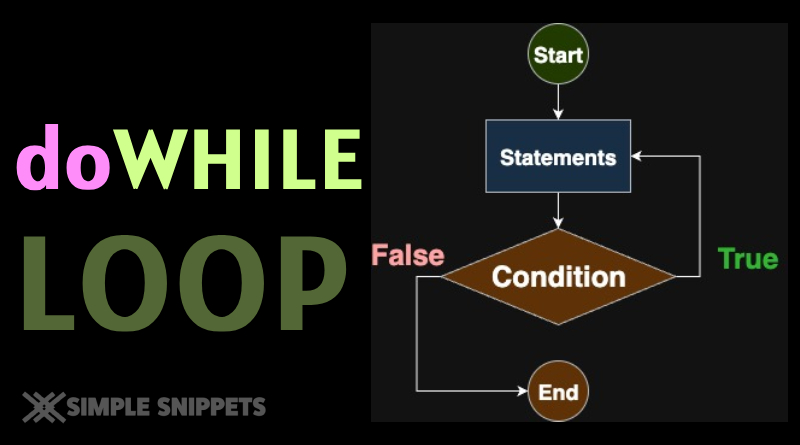
The do-while loop in C++ is similar to the while loop, but with one key difference:
👉 The loop body executes at least once, even if the condition is false initially.
That’s why it’s called an exit-controlled loop.
Syntax
do {
    // statements
} while (condition);- Loop executes body first.
- Then condition is tested.
- If true → repeat body. If false → exit.
Working of Do-While Loop
- Run loop body once.
- Test the condition.
- If true → repeat body → step 2.
- If false → exit loop.
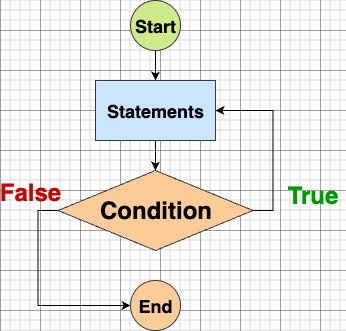
Example: Menu-driven program using Do-While
#include <iostream>
using namespace std;

int main() {
    int choice;
    do {
        cout << "Menu:\n";
        cout << "1. Say Hello\n";
        cout << "2. Say Bye\n";
        cout << "3. Exit\n";
        cout << "Enter choice: ";
        cin >> choice;

        switch (choice) {
            case 1: cout << "Hello!\n"; break;
            case 2: cout << "Bye!\n"; break;
            case 3: cout << "Exiting...\n"; break;
            default: cout << "Invalid choice!\n";
        }
    } while (choice != 3);

    return 0;
}Key Points
- Exit-controlled loop → executes at least once.
- Condition is tested after the body.
- Useful in menu-driven programs or situations where the first run must always happen.
Differences Between While and Do-While
| Feature | While Loop | Do-While Loop |
|---|---|---|
| Condition check | Before loop body (entry-check) | After loop body (exit-check) |
| Execution count | May run 0 times | Runs at least once |
| Use case | Repeat until condition is true | Menu systems, input validation |
Tips
- Always terminate the
do…whilewith a semicolon (;) after the condition. - Don’t confuse it with while — the placement of condition is the key difference.